

Qr Codes For Small Business — The Complete Guide To Getting Results (And The Mistakes That Waste Your Money)

Updated: April 2026
QR codes for small business marketing work by linking your physical materials — signs, business cards, packaging, print ads — directly to a digital destination your customer acts on immediately. A well-placed QR code with a clear call to action can turn a stranger holding a flyer into a lead in your CRM. A poorly placed one with no context gets ignored every time. The difference has nothing to do with the code itself. It has everything to do with strategy.
Small businesses are scanning in. Wave Connect’s 2025 data puts QR code growth at 323% between 2021 and 2025, with 60% of small businesses now using them for marketing. Yet most campaigns underperform — because the code is the easy part. Placement, context, and what happens after the scan determine whether a QR code generates business or collects dust.
What is a QR code and how does it work for small businesses
A QR code is a scannable square image that stores data — most often a URL — and sends anyone who scans it directly to a webpage, form, video, or digital menu. QR stands for Quick Response, and that speed is the whole point. Your customer opens their phone camera, points it at the code, and they’re on your landing page in under three seconds. No typing, no searching, no friction.
For small businesses, that frictionless bridge between your physical world and your digital one is genuinely valuable. According to Wave Connect’s 2025 data, QR code usage grew 323% between 2021 and 2025, and mobile QR usage is projected to grow another 30% annually through 2028. Over two-thirds of consumers have used a QR code in the past year. This is mainstream behavior now.
There are two types of QR codes, and choosing the wrong one is the first place small businesses lose money.
Static QR codes
A static QR code has the destination URL baked permanently into the code itself. Once you print it, that destination is fixed. Change the URL and the code is dead — meaning you either reprint everything or abandon the campaign. Static codes work fine for one-time uses where the destination will never change, like adding your WiFi password to a wall sign or linking to a permanent product page.
Dynamic QR codes
A dynamic QR code stores a short redirect URL. You can update the destination anytime — without changing the printed code. Run a spring promotion and update it to a summer one in June without reprinting a single flyer. Dynamic codes also give you scan analytics: how many people scanned, from what location, on what device, and at what time. For any marketing campaign, dynamic is the only sensible choice.
| If You See This… | It Means… | Your Next Move |
|---|---|---|
| You used a free generator like Canva or QRCode Monkey | You probably have a static code with no analytics | Fine for permanent destinations; switch to dynamic for campaigns |
| You’re running a seasonal promotion | Static code means reprinting when the offer changes | Use a dynamic code generator (Bitly, QR Tiger, Pageloot) |
| You have no idea how many people scanned your code | You’re flying blind on whether the campaign worked | Switch to dynamic and add UTM parameters to your destination URL |
The free QR code generator trap most small businesses fall into
Free QR code generators are everywhere, and most small businesses use them without thinking twice. Canva has one. Google has one. Dozens of random websites offer them. For a permanent, unchanging destination, they’re perfectly adequate.
The problem shows up six months later, when a customer tries to scan your business card or your window decal and gets an error page.
Many free QR code services — especially smaller platforms — shut down, change their URL structure, or simply expire codes after a period of inactivity. MobiQode’s 2026 analysis found that free tool scan limits and expiration dates are among the most common reasons small businesses discover their QR codes have stopped working — and they typically find out from a customer, not from their own testing.
The math on this is straightforward. A dynamic QR code from a reliable paid platform runs around $10 to $20 per month. If your code appears on 500 printed flyers that you hand out over six months, the cost per piece is essentially zero. A code that expires halfway through your campaign costs you every scan you don’t get.
Where QR codes for small business marketing actually work
Placement determines whether a QR code gets scanned or ignored. The best placements share three things: the customer has their phone out or within easy reach, they have a reason to want more information, and they have a moment to act. Match those three and scan rates go up significantly. Pageloot’s 2026 research found that shoppers are 2.3 times more likely to scan when there’s an immediate, stated reward involved.
Here are the placements that consistently produce results for small businesses, organized by what you’re trying to accomplish.
To get reviews
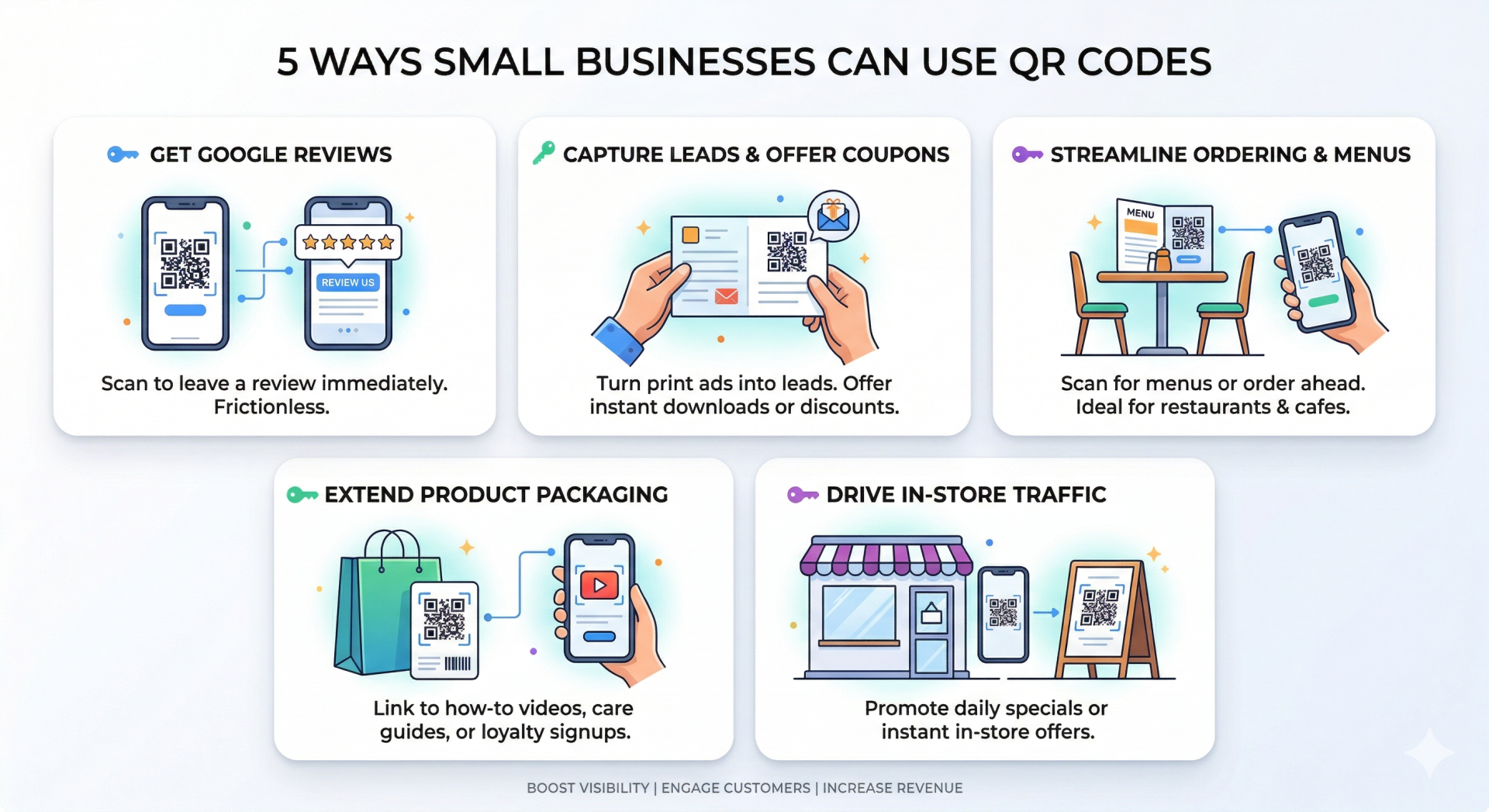
Put a QR code on your checkout counter, your receipt, or a small table card that sends customers directly to your Google Business Profile review page. Pair it with a sign that says “Scan to leave us a review — takes 30 seconds.” The friction of finding your business on Google and navigating to reviews kills most review attempts. Remove that friction.
To drive foot traffic from print
Business cards, postcards, door hangers, and other print marketing materials work well because the person is already holding the material and their phone is typically nearby. A QR code on a business card that links to a specific offer (a discount, a free download, a booking page) gives the card a job beyond contact storage. If you’re handing out cards at conferences or networking events, link to a page built specifically for that audience.
To capture leads at events
A QR code on your trade show banner or booth display that links to a simple opt-in form works when the offer is clear and immediate. “Scan for the free checklist” beats “scan to learn more” every time. Give them something worth the scan.
To extend your packaging
Product labels, shopping bags, and packaging are prime QR code real estate because the customer has already bought from you. Link to a how-to video, a care guide, a loyalty program signup, or a birthday club. The post-purchase moment is one of the highest-trust interactions you have with a customer — use it.
To get people into your store
Window displays and sidewalk signs work when the QR code promises something worth walking in for. “Scan for today’s special” on a window sign catches foot traffic that might otherwise walk past. Pair this with your foot traffic strategy so the in-store experience delivers on the promise.
QR code call to action examples that get scanned
The four words printed next to your QR code carry more weight than the code itself. Without a clear call to action, most people walk past. The CTA answers the customer’s only question: “Why should I bother?”
Here are call to action examples organized by what you want the customer to do, pulled from campaigns that work in real small business environments.
Lead capture CTAs
- “Scan for the free guide — instant download”
- “Scan to join the VIP list — first look at new arrivals”
- “Scan to grab your coupon before you leave”
Review request CTAs
- “Scan to review us on Google — takes 30 seconds”
- “Loved your visit? Scan to tell us”
Purchase and order CTAs
- “Scan to order ahead — skip the line”
- “Scan to see today’s menu”
- “Scan for exclusive online pricing”
Content and information CTAs
- “Scan to watch the demo”
- “Scan for the full ingredient list”
- “Scan to see how it’s made”
The pattern across all of these is specificity. “Scan to learn more” tells the customer nothing. “Scan to download the free meal plan” tells them exactly what they get and why it’s worth thirty seconds of their time.
Where NOT to put a QR code — the placements that waste your money
This is the section that every other QR code guide skips. There’s a lot of well-meaning advice about where to put QR codes. Almost nobody writes about where they fail — and some of these failures are expensive.
Your email newsletter
Your newsletter reader is already on a screen. Adding a QR code forces them to pick up a second device, open their camera, scan, and then put the phone down. That’s four extra steps to do something a hyperlinked button does in one click. Use a button. Save the QR code for print.
Social media posts
Same problem. Your audience is already digital. A QR code in a Facebook post or Instagram image asks someone to screenshot the post, open their camera app, and scan a screen with their screen. It’s technically possible. Nobody does it. Use the link in bio or a swipe-up instead.
A moving vehicle
A QR code on a car door or van wrap can’t be scanned from another moving vehicle, and a pedestrian gets about 1.5 seconds before the car passes. A vanity URL — something short and memorable like YourBiz.com/offer — works far better on vehicles because people can read and remember it.
A highway billboard
Driving 65 miles per hour past a billboard while trying to aim a phone camera creates a scanning distance problem and a safety problem simultaneously. Smashing Magazine noted in their QR code best practices guide that highway placements create real accident risk. Use billboards for brand awareness and short URLs, not QR codes.
A PDF you’re sending digitally — unless you do this
A QR code in a PDF you’re emailing forces the recipient to pick up their phone, open the camera, and scan their own computer screen. That’s an obstacle course, not a customer journey. Two things belong in a digitally-shared PDF instead.
A clickable QR code image. Keep the QR code as a visual element — it looks familiar and signals “there’s something here worth accessing” — but make the image itself clickable. In Canva, select the QR code image, click the link icon, and paste your destination URL before exporting as an interactive PDF. In Adobe Acrobat or Foxit, use the link tool to attach the URL to the image after the fact. Either way, clicking the image opens the destination directly. No phone required.
A short, typeable URL right next to it. Use a URL shortener like Bitly to create a branded, memorable link — something like bit.ly/your-offer — and display it as plain text beneath the QR code image. Someone on a computer clicks the link. Someone who prints the document scans the code. Both paths work. That’s the point.
The one exception: PDFs designed specifically for printing — menus, brochures, sell sheets that recipients will physically print and pass along. If someone will ever hold a printed version, the QR code earns its place on its own. The question to ask before you design is simple: will this ever be paper?
The bottom of a long document
If your QR code is on page 4 of a brochure or at the bottom of a poster after three paragraphs of text, most people have already decided whether they’re interested. Put the code near your hook — early in the layout, close to the offer that motivated them to pick the piece up in the first place.
Anywhere without a stated reason to scan
In 2011, American Express sent small business merchants a window decal with a QR code for a Shop Small Saturday promotion. The decal included no reason for customers to scan. The code worked. The campaign didn’t, because nobody knew what they were scanning into. The lesson from that campaign remains relevant: the call to action is more important than the code. Without one, the code is invisible.
| Skip the QR Code Here | Why It Fails | Use This Instead |
|---|---|---|
| Email newsletters | Reader is already on a screen | Hyperlinked button |
| Social media posts | Already digital — adds steps | Link in bio, swipe-up |
| Vehicle wraps / car doors | No time to scan from traffic | Short vanity URL |
| Highway billboards | Safety hazard + impossible to scan | Short URL + brand name only |
| Digitally-sent PDFs | Reader is on a screen — scanning it is an obstacle | Clickable QR image + short typeable URL (e.g. bit.ly/your-offer) |
| Bottom of long documents | Decision already made; too late | Near the top, close to the offer |
| Glossy surfaces in direct sunlight | Glare kills the scan | Matte finish, shaded placement |
| Anywhere with no stated reason | No CTA = no scan | Add the offer right next to the code |
What happens after someone scans your QR code
The scan is the beginning of a conversation, not the end of one. Most small businesses think about QR codes as a way to get someone to a page. The smarter question is: what do you want them to do on that page, and what happens next?
Getting your funnel right matters here. A QR code scanner is a warm prospect — they physically stopped, picked up their phone, and scanned. Treat them accordingly.
There are three outcomes worth building for:
They give you their contact information. This is the gold standard. Build a landing page with a simple opt-in offer — a discount, a download, a free consultation — and you’ve turned a scan into a lead you can follow up with. From there, your email nurture sequence does the work.
They make a purchase or take a direct action. Send them to a specific product page, a booking form, or an order page. The landing page should match the promise on the printed material exactly. If the flyer says “scan for 15% off,” the page should show the discount code immediately, above the fold, the moment they arrive.
They bounce — but you can still reach them. This is the part most small businesses don’t know about. Even if someone scans your QR code and leaves without filling out a form, if your landing page has a Facebook Pixel or Google Tag installed, you can add that anonymous visitor to a retargeting audience and serve them ads later. They showed enough interest to scan. A follow-up ad with the same offer can bring them back.
There’s a full guide coming on the “after the scan” strategy — covering UTM tracking, anonymous retargeting, and what a QR-driven nurture sequence looks like in practice. For now, the minimum standard is this: every QR code you print should go to a dedicated landing page, and that page should have one clear action for the visitor to take.
If you need help auditing your current setup — whether your QR codes are actually driving results or just taking up space on your print materials — a Fix-It Session can show you exactly what to fix in 24 hours.
Frequently asked questions about QR codes for small business
QR codes are free to create using tools like Canva, QRCode Monkey, or Google’s built-in QR generator. Free codes are static — meaning you can’t update the destination or track scans. For marketing campaigns where you need analytics and the ability to update links, dynamic QR code tools start around $10 to $20 per month. For most small business marketing use, the paid option pays for itself quickly.
A static QR code has the destination URL encoded permanently into the image. Once printed, the destination cannot change. A dynamic QR code uses a short redirect URL that you can update anytime — without changing the printed code. Dynamic codes also track how many people scanned, what device they used, and where the scan happened. For any marketing campaign, dynamic codes are the better choice.
If you used a static QR code from a free generator, you don’t know — and there’s no way to find out. Dynamic QR code platforms like Bitly, QR Tiger, and Pageloot show you scan volume, device type, geographic location, and time of day. You can also add UTM parameters to your destination URL and track scans directly in Google Analytics 4 as a separate traffic source.
Static codes created from major free tools like Canva do not expire — the destination is baked into the code itself. Free codes from smaller or less established platforms may expire if the company shuts down or changes their URL structure. Dynamic QR codes from paid platforms remain active as long as your subscription does. Always test your codes on both an iPhone and Android before printing materials, and scan the final printed version before wide distribution.
Your QR code should link to a specific landing page built for the context of the scan. Send homepage traffic to your homepage. Send QR code traffic to a page that fulfills the exact promise printed next to the code. If the code is on a flyer promoting a discount, the page should show that discount immediately. If it’s on product packaging, link to a how-to video or loyalty program signup. The landing page should have one clear action for the visitor to take. Every extra option on the page reduces the chance they take any action at all.
Additional reading
- 19 best marketing materials for small businesses
- How to get foot traffic through your door
- Marketing strategies for small business
- Free marketing plan templates
Low budget marketing strategies for CEOs with no marketing department. Join DIYMarketers.com for free marketing tips.
Source: https://diymarketers.com/qr-codes-for-small-business/
Anyone can join.
Anyone can contribute.
Anyone can become informed about their world.
"United We Stand" Click Here To Create Your Personal Citizen Journalist Account Today, Be Sure To Invite Your Friends.
Before It’s News® is a community of individuals who report on what’s going on around them, from all around the world. Anyone can join. Anyone can contribute. Anyone can become informed about their world. "United We Stand" Click Here To Create Your Personal Citizen Journalist Account Today, Be Sure To Invite Your Friends.
LION'S MANE PRODUCT
Try Our Lion’s Mane WHOLE MIND Nootropic Blend 60 Capsules
Mushrooms are having a moment. One fabulous fungus in particular, lion’s mane, may help improve memory, depression and anxiety symptoms. They are also an excellent source of nutrients that show promise as a therapy for dementia, and other neurodegenerative diseases. If you’re living with anxiety or depression, you may be curious about all the therapy options out there — including the natural ones.Our Lion’s Mane WHOLE MIND Nootropic Blend has been formulated to utilize the potency of Lion’s mane but also include the benefits of four other Highly Beneficial Mushrooms. Synergistically, they work together to Build your health through improving cognitive function and immunity regardless of your age. Our Nootropic not only improves your Cognitive Function and Activates your Immune System, but it benefits growth of Essential Gut Flora, further enhancing your Vitality.
Our Formula includes: Lion’s Mane Mushrooms which Increase Brain Power through nerve growth, lessen anxiety, reduce depression, and improve concentration. Its an excellent adaptogen, promotes sleep and improves immunity. Shiitake Mushrooms which Fight cancer cells and infectious disease, boost the immune system, promotes brain function, and serves as a source of B vitamins. Maitake Mushrooms which regulate blood sugar levels of diabetics, reduce hypertension and boosts the immune system. Reishi Mushrooms which Fight inflammation, liver disease, fatigue, tumor growth and cancer. They Improve skin disorders and soothes digestive problems, stomach ulcers and leaky gut syndrome. Chaga Mushrooms which have anti-aging effects, boost immune function, improve stamina and athletic performance, even act as a natural aphrodisiac, fighting diabetes and improving liver function. Try Our Lion’s Mane WHOLE MIND Nootropic Blend 60 Capsules Today. Be 100% Satisfied or Receive a Full Money Back Guarantee. Order Yours Today by Following This Link.


| Visits: | 1,803,502,373 |
| Stories: | 8,636,584 |
Whistler Blowers, Insiders

